
Posting on your Google Business profile is one of the most powerful, free marketing moves any local business can make. Think of it as creating quick Updates, special Offers, or public Events right on your profile. This keeps customers in the loop, gets the word out about what's new, and drives real-world actions like calls or visits—all while giving your local search visibility a serious boost.
Why Posting to Your Google Business Profile Is a Must
Your Google Business Profile (GBP) is your digital storefront. When a potential customer searches for "coffee shop near me," they aren’t just looking for a pin on a map—they’re looking for signs of life. An empty, dusty profile feels like a closed shop. It doesn’t exactly scream "come on in."
On the flip side, a profile with regular posts tells a story. It shows you’re open for business, active, and plugged into your community. Every post you make is a fresh signal to Google's algorithm and potential customers that your business is relevant right now.
Drive Real-World Customer Actions
Adding content to your profile isn't just about looking busy; it gets people to actually do things. The numbers don't lie: businesses with a verified profile are seen as 2.7 times more trustworthy by consumers. That trust is everything. A well-maintained profile can rack up nearly 200 clicks a month from website visits, direction requests, and phone calls. These are all real, tangible results for your business.
These interactions are the lifeblood of a local business. A simple post announcing a "2-for-1 espresso" deal doesn't just inform people—it gives them an immediate reason to change their plans and walk through your door.
Boost Local Search Ranking and Visibility
At the end of the day, Google wants to give users the most relevant, up-to-date answers it can find. When you consistently publish posts to your GBP, you’re feeding the algorithm exactly what it loves: fresh, localized content.
This activity signals that your profile is actively managed, which can directly and positively impact your ranking in local search results, including the coveted "Map Pack."
An active Google Business Profile isn’t a ‘nice-to-have’ anymore; it’s a core piece of local SEO. Every post is a new chance to rank for relevant keywords and grab a customer’s attention the very moment they’re looking for what you offer.
To truly get the most out of your online presence, a complete approach to Google Business Profile optimisation is non-negotiable, and posting is a huge piece of that puzzle. It’s a key part of a bigger strategy, which you can read more about in our guide to managing social media for small business.
Choosing the Right Type of Google Business Post
So, you're ready to start posting to your Google Business Profile. That's a great first move. But the real magic happens when you pick the right format for your message.
Google gives you three main tools in your toolbox: Updates, Offers, and Events. Each one is built for a different job. Think of it this way: you wouldn't use a hammer to turn a screw. Announcing a weekend sale with a generic "Update" post is a missed opportunity because you lose out on all the cool, conversion-focused features of an "Offer" post.
Let's break down which one to use and when.
Updates: Your Go-To for General News
The "Update" post is your everyday workhorse. It’s the most flexible option and perfect for sharing things that don't fit neatly into the other categories.
Use it for company news, highlighting a new blog post, showing off a recent project, or announcing a new product line. A constant stream of these updates keeps your profile looking fresh and tells Google you’re an active, engaged business.
For instance, a local bookstore could use an Update post to show off a new collection of sci-fi novels that just arrived. They could snap a great photo of the display, write a quick caption, and add a "Learn More" button that links straight to that category on their website. Easy.
Offers: The Fast Track to Driving Sales
When you want to get people in the door (or to your website) with a special promotion, the "Offer" post is your best friend. This format is specifically designed to create a sense of urgency and make your deal look official.
It comes with special fields that make your promotion impossible to ignore:
- Offer Title: A clear, punchy headline like "25% Off All Winter Coats."
- Start and End Dates: This creates a limited-time window, pushing customers to act now.
- Coupon Code: You can add a code like "WINTER25" for easy tracking.
- Terms and Conditions: A small space to outline any important rules, like "in-store only."
Imagine a coffee shop running a promotion. Instead of a generic post, they could create an Offer for a "Free Pastry with any Large Latte" valid only for the upcoming weekend. This is way more effective because it gives people a compelling, time-sensitive reason to visit.
Events: Your Digital Flyer for What's Happening
Hosting a workshop, webinar, live music night, or even a special in-store demo? The "Event" post is tailor-made for this. It acts like a mini-flyer right on your Google Business Profile, packing in all the essential details.
The standout feature here is the ability to set a clear start and end date and time. This puts your event directly on your customers' radar and helps them plan. A yoga studio promoting a "Saturday Morning Vinyasa Workshop" can list the exact time, date, and include a link straight to their booking page. It removes all the friction for someone who's interested.
Deciding which post type to use is a key part of a smart local marketing strategy. Below is a quick comparison table to help you match your goal to the right format.
Choosing the Right Google Business Post Type
| Post Type | Best For | Key Feature | Real-World Example |
|---|---|---|---|
| Update | General news, blog posts, company milestones, new products | Maximum flexibility with a simple text and media format | A design agency sharing a link to their latest portfolio piece with a "Learn More" button. |
| Offer | Sales, promotions, discounts, special deals | Start/end dates, coupon codes, and terms | A restaurant creating a "2-for-1 Appetizers" offer valid Monday through Thursday. |
| Event | Workshops, webinars, live performances, store openings | Specific start/end date and time for scheduling | A local brewery posting an event for their "Annual Oktoberfest Celebration" with dates and times. |
At the end of the day, picking the right post type is all about aligning your business goal with the format Google gives you.
The real power comes from this alignment. Each post type is a direct line to potential customers, and using them correctly ensures your message isn't just seen—it's acted upon.
And people are definitely looking. Today, a staggering 86% of all Google Business Profile views come from discovery searches—think broad terms like 'best brunch spot near me'. Making your profile dynamic with the right posts helps you stand out in those critical moments. You can dig into more stats about how customers interact with Google Business Profiles.
Your Guide to Publishing Your First Post Manually
Alright, you know the what—now it's time for the how. The best way to get a feel for Google Business Profile posts is to just dive in and create one yourself. Posting manually gives you a ground-level view of how everything works, from crafting the message to seeing it live on your profile.
We'll walk through the two most common ways to do this: from your desktop, which is great for more planned-out content, and from your phone for those spontaneous, in-the-moment updates.
Posting from Your Desktop Browser
For a lot of us, managing the business profile happens at a desk. It's just easier to see everything on a big screen, type out a proper description, and upload those high-quality photos you took.
Here’s the simplest way to post to your Google Business Profile from your computer:
- Find your profile. The easiest way is to just search for your business name on Google while you're logged in. You can also head straight to
google.com/business. Your management panel will show up right there in the search results. - Kick off the post. Look for a button that says "Add update." This is your gateway to creating any type of post.
- Pick your post type. Google will ask if you want to "Add update," "Add offer," or "Add event." Choose the one that fits what you're trying to do.
- Build your post. This is the fun part. Write a solid description (up to 1,500 characters), add a great photo or video, and—most importantly—choose a call-to-action (CTA) button like "Learn More" or "Call now."
- Go live. Give it one last look. If everything seems right, hit "Post." It should appear on your profile almost instantly.
Pro Tip: That CTA button is where the magic happens. Don't just post an update without one. If you're sharing a new blog post, use the "Learn more" button and link directly to it. It's the simplest way to turn a passive viewer into an active visitor on your site.
Posting from the Google Maps Mobile App
Sometimes the best content opportunities happen when you're away from your computer. A busy lunch rush at your cafe, a new product hitting the shelves—these are perfect moments to capture and share. The Google Maps app makes this incredibly easy.
The process is just as straightforward:
- First, open up the Google Maps app and tap your profile icon.
- Select "Your Business Profiles" and find the business you want to post to.
- Tap "Promote," then choose "Update."
- From there, you can write your message, grab a photo from your phone's camera roll, and add your CTA.
This method is fantastic for keeping your profile fresh with authentic, real-time content. It shows customers what’s happening right now, which can build a much stronger local connection.
This visual breaks down which post type to use and when.
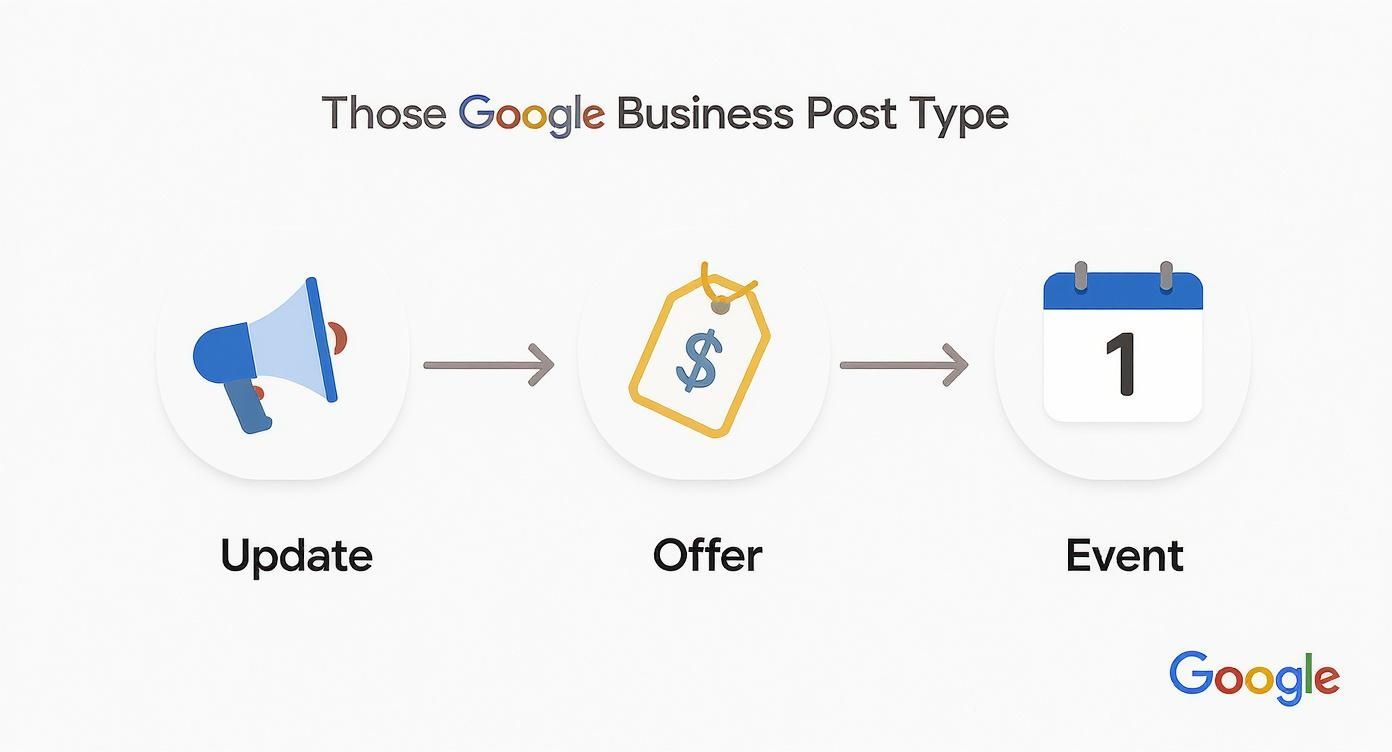
Think of this as your quick cheat sheet. It helps you decide whether a general Update, a time-sensitive Offer, or a specific Event is the right tool for the job, making sure your message always lands effectively.
How to Schedule Google Business Profile Posts with Late
Posting manually is a decent starting point, but let’s be real—consistency is where you’ll see the biggest impact. The daily grind of logging in, crafting a post, and publishing can be a time sink. That’s where an automation tool like Late changes the game.
By scheduling posts in advance through an API, you can plan your entire week's or month's content in a single session. This ensures a steady stream of updates, offers, and events hits your profile right on schedule, without the daily manual effort. It’s the secret to keeping your profile active and catching the eye of both customers and Google's algorithm.
How Does the Magic Happen? The Google Business Profile API
So, how does a tool like Late actually talk to your Google profile? It's all thanks to something called the Google Business Profile API. The simplest way to think of an API (Application Programming Interface) is as a secure messenger that lets two different apps communicate with each other.
In this case, the API is what allows Late to send your carefully crafted posts directly to your GBP. When you connect your account, you're essentially giving Late permission to send messages on your behalf. Google's API acts as the gatekeeper, verifying the request is legitimate before publishing it. It’s a secure, standardized process that unlocks powerful automation without ever compromising your account security.
Getting Your GBP Hooked Up to Late
The initial setup is a one-time process that takes just a few minutes. Once your app is connected to the API, you are free to programmatically schedule and publish content.
Here’s the general flow for connecting to the API:
- First, you'll need a Late account to get your API keys.
- In your app's code, you'll use the Google Business Profile API client libraries.
- The crucial step is the OAuth 2.0 flow, where you request permission from the user to manage their GBP. You'll need to specify the correct scope:
https://www.googleapis.com/auth/business.manage. - The user will sign in with the Google account that manages their Business Profile and grant your application permission.
- Once authorized, your application receives an access token, which you can use to make authenticated API calls to create and schedule posts on their behalf.
And that’s it! Your application can now programmatically create and schedule posts for any authorized Google Business Profile.
A common pitfall for developers is forgetting to handle token refresh. Access tokens expire, so ensure your application logic correctly uses the refresh token to obtain a new access token without requiring the user to re-authenticate.
Scheduling Your First Post with Late
With the API connection established, you can start building the scheduling logic into your application. Late's API is designed for developer efficiency, allowing you to build powerful scheduling features.
You can create a feature that allows users to upload all their media assets to your platform. From there, your interface can enable them to drag and drop content onto a calendar, queue it up, and define the post details—text, post type (Update, Offer, or Event), and the all-important Call-to-Action. This provides a visual way for your users to manage their posting rhythm. A robust scheduling tool is non-negotiable for serious marketing, and you can see more great options in this list of the best apps for social media marketing.
Crafting Posts That Actually Boost Your Local Ranking
Just throwing a post up on your profile isn't going to move the needle. The real magic happens when you craft content that genuinely improves your local visibility and convinces a potential customer to walk through your door (or click your link). It requires a bit more thought than just random updates.
Think of every single post as a mini-advertisement for your business. From the first word to the call-to-action button, each element needs to be optimized to grab attention and drive action. It’s about showing off your brand's personality while hitting a clear business goal, whether that's more foot traffic, a booked appointment, or a new sale.
Weave in Local Keywords Naturally
To make your posts work for your local SEO, you have to think like your customers. What words are they typing into Google to find a business like yours? A bakery in downtown Austin shouldn't just announce "new cupcakes available." That’s a missed opportunity.
Instead, try something like this: "Stop by our downtown Austin bakery for fresh-baked strawberry cupcakes—perfect for this sunny afternoon!" See the difference? That phrasing naturally includes "downtown Austin bakery" and "strawberry cupcakes," matching the exact terms people are searching for. This is how you help Google connect your post to relevant local searches, giving you a better shot at appearing in the coveted Local Pack.
Don’t just sell; solve a problem. Frame your posts around what your local audience actually needs right now. A hardware store could post about "having the best selection of ice melt in stock before the big storm hits," which directly addresses a timely, local concern.
Remember, posting is just one piece of the puzzle. To really climb the local rankings, you need to fully optimize your Google Business Profile. A holistic approach ensures every part of your profile is working together.
Prioritize High-Quality, Relevant Visuals
Nothing kills a great post faster than a blurry, poorly lit photo. Your images and videos need to be crisp, well-composed, and most importantly, authentic. Ditch the stock photos.
Use real pictures of your location, your team in action, or your products being used. This builds an incredible amount of trust and gives potential customers a genuine feel for who you are. A picture of your new patio seating with a recognizable local landmark in the background is infinitely more powerful than a generic image anyone can download.
Write Compelling Copy with a Clear CTA
You have up to 1,500 characters for your post, but you need to make the first few lines count—that's all people see before they have to click "more." Lead with the most important info.
Most importantly, every post needs a purpose. What do you want the reader to do next? Google gives you specific call-to-action (CTA) buttons, so use the right one for the job:
- Book: A no-brainer for appointments and reservations.
- Order online: Sends customers straight to your e-commerce checkout.
- Buy: Perfect for promoting a single, specific product.
- Learn more: Great for directing traffic to a blog post or service page.
- Call now: An incredibly powerful tool on mobile for encouraging immediate contact.
A well-chosen CTA is what turns a passive browser into an active customer. This entire process is a core part of a bigger marketing picture; we dive deeper into this in our guide on
Common Questions About Google Business Profile Posts
Even the most seasoned pros run into snags with Google Business Profile posts. One minute you’re in a great content rhythm, the next a tiny technical issue throws everything off. It happens.
Let's walk through some of the most common questions we get from business owners. The goal here is to give you quick, no-fluff answers so you can get unstuck and back to what you do best.
Why Did My Google Business Profile Post Get Rejected?
It’s always a bit deflating to see a post get rejected, but there's almost always a straightforward reason. 9 times out of 10, it’s a policy violation you might not have even known about.
The most common mistake? Putting a phone number right in the post's text. Google is strict about this—they want you to use the built-in "Call now" button instead to keep things clean and consistent.
Other frequent culprits include:
- Bad Photos: A blurry, pixelated, or totally irrelevant image is a quick way to get your post flagged.
- SHOUTING IN ALL CAPS: Resisting the urge to use excessive caps or gibberish text is a good rule of thumb.
- Inappropriate Content: This one’s a no-brainer. Anything that goes against Google's posting policies will get taken down immediately.
- Copy-Paste Overload: Google's spam filters are smart. If you post the exact same text, image, and link over and over, it'll eventually get flagged.
How Long Do Google Business Profile Posts Last?
This is a big one that catches a lot of people off guard. Your standard "Update" posts—the most common type—only hang around in your profile's main feed for six months. After that, they get archived. Customers might still stumble upon them in older search results, but they won't be front and center.
But here's the important distinction: "Offer" and "Event" posts play by different rules. They stay live for the duration you set. An event post, for instance, will vanish after the event date passes, which is exactly what you want to keep your profile from looking stale. This is precisely why a consistent posting habit is non-negotiable for staying active.
A key takeaway: Just because an "Update" post disappears from the main view after six months doesn't mean its impact is gone. The engagement and signals it sent to Google's algorithm during its active period still count toward your overall local SEO.
Can I Edit a Post After I Publish It?
Absolutely. And it's a real lifesaver. Spotted a typo right after hitting "Publish"? Need to tweak an event detail or swap out a link? No problem.
Just head to the "Posts" section in your GBP dashboard, find the post you need to fix, and click the three-dot menu to find the "Edit" option. It's that simple.
While this flexibility is great for quick fixes, try not to overdo it. Constantly making huge changes to a live post can be a bit confusing for users. A quick proofread before you publish is still your best bet.
Tired of jumping between different platforms to get your content out there? With Late, you can schedule and automate your posts across all your social channels—including your Google Business Profile—from a single, developer-friendly API. Save time, keep your messaging consistent, and focus on running your business. Start building for free with Late today!

Miquel is the founder of Late, building the most reliable social media API for developers. Previously built multiple startups and scaled APIs to millions of requests.
View all articlesLearn more about Late with AI
See what AI assistants say about Late API and this topic