
Of course. Here is the rewritten section, crafted to sound like it was written by an experienced human expert, following all your specified requirements.
So, can you actually schedule Facebook posts via the API?
Absolutely. The whole magic happens with a POST request to the Facebook Graph API’s /{page-id}/feed endpoint. You just need to include two key parameters: published=false and a future UNIX timestamp for scheduled_publish_time. This simple combo gives you direct, programmatic control over your entire content calendar.
Why Automate Facebook Posts with the API

Before we jump into the code, it’s worth pausing to think about why you’d want to go this route. Sure, third-party tools are handy, but direct API integration is a game-changer for control, scale, and raw efficiency. This is especially true for developers, agencies, and businesses juggling a ton of different accounts.
Building your own scheduling solution transforms social media management from a tedious, manual chore into a reliable, automated engine. You’re not just writing code; you're creating a robust system that fits your exact operational needs like a glove.
The Strategic Edge of API Automation
When you integrate directly, you can do things like batch-process entire campaigns or maintain a perfectly consistent brand voice across dozens of Pages. Imagine scheduling a whole month of content for multiple clients with a single script. That’s the kind of power we're talking about here.
This sort of automation is really the backbone of any serious social media content management system. The benefits quickly stack up:
- Precision and Timing: You can programmatically schedule posts to go live during peak engagement windows, getting maximum reach without someone having to be awake at 3 AM to click "publish."
- Scalability: Effortlessly manage content for hundreds of Facebook Pages from one central app. Trying to do that by hand is a recipe for disaster.
- Consistency: Keep your brand’s messaging and posting cadence locked in. This is absolutely critical for building and keeping an audience engaged over the long haul.
- Workflow Integration: Hook your scheduling logic directly into other internal tools, like your CMS or a product database, to create a seamless pipeline from content creation to publishing.
For marketers trying to squeeze every ounce of efficiency out of their workflow, it's also worth exploring how to create authentic AI generated social media posts that genuinely connect with your audience.
Ultimately, choosing to schedule Facebook posts via the API is an investment. You're building a scalable, future-proof social media machine that puts you firmly in control.
Navigating the Meta Developer Dashboard
Before you write a single line of code to schedule a Facebook post, you have to start at the source: the Meta Developer Dashboard. This is your command center for creating and managing the apps that talk to the Graph API. Think of it as laying the digital foundation before you can build your automation house.
Getting set up is pretty straightforward. You'll create a new "App," which is just Meta's term for a distinct project. When it asks for an app type, you’ll almost always want to pick Business. This type is designed to give you the right access to products and permissions for managing business assets, like a Facebook Page.
Configuring Your App for Page Management
Once your app is created, you’ll be dropped onto its main dashboard. Right away, you'll see your App ID and App Secret—these are the keys to the kingdom. Treat the App Secret like you would any other sensitive credential. It should never, ever be exposed in client-side code or committed to a public Git repository. Seriously.
From this dashboard, your next move is to add the "Facebook Login" product. This might sound counterintuitive if you're building a backend script with no user interface, but it's a non-negotiable step. This product enables the OAuth 2.0 flow, which is the secure, industry-standard way you'll get permission from a user to manage their Pages.
The image below shows the "My Apps" screen where this whole journey begins.
This dashboard is where you'll create new apps or tweak existing ones, with each one acting as a unique bridge to Meta's services.
Understanding Critical Permissions
With the Facebook Login product in place, you need to tell Meta what your app actually intends to do. This is handled through permissions, or "scopes." Getting these right is crucial. For scheduling posts to a Facebook Page, two scopes are absolutely vital:
pages_manage_posts: This is the big one. It's the core permission that grants your app the power to create, edit, and delete posts on any Page the user administers. Without it, you’re not publishing anything.pages_read_engagement: While not strictly mandatory for scheduling, I highly recommend including this. It lets you pull back data like likes, comments, and shares, which is invaluable if you plan to build any kind of reporting or analytics feature down the line.
You'll request these permissions during the authentication flow. Keep in mind that for your app to be used by anyone other than yourself, it will need to pass Meta's App Review process.
From my experience, navigating the App Review process can be a real sticking point for developers. Be ready to provide a crystal-clear explanation and a detailed screencast showing exactly how your application uses these permissions. Meta is extremely strict about protecting user privacy, so they need to see that you're using the permissions for their intended purpose.
Nailing this initial setup is everything. A properly configured app with the right permissions is the only way you'll be able to get the access tokens needed to make your first API call. Get this foundation right, and the rest of the process becomes much smoother.
Getting the Right Keys: Page Access Tokens
Before your app can even think about scheduling posts, it needs permission. In the world of the Facebook API, that permission comes in the form of an Access Token. Think of it as a special key that proves your application is allowed to act on behalf of a user or, in our case, a Facebook Page.
The whole process of getting this key is a multi-step dance called the OAuth 2.0 flow. It all starts with a temporary pass: a short-lived User Access Token.
This initial token is tied directly to the person who authorizes your app and usually expires in about an hour. It’s just enough to get you in the door, but it’s not the key you’ll use for any serious, long-term automation.
From a Temporary Pass to a 60-Day Key
Your real goal is to get a token that doesn't need constant babysitting. The first step is to trade that short-lived User Access Token for a long-lived one. This happens through a quick server-to-server call to the oauth/access_token endpoint.
This new token is much more useful, lasting for about 60 days. While that’s a big improvement, it’s still not the "set it and forget it" key we need for a scheduling app. You can't skip this step, though—it's a mandatory bridge to get to the final token.
The Final Prize: The Permanent Page Access Token
With your long-lived User Access Token in hand, you can finally go after the holy grail: the permanent Page Access Token. This is the key that unlocks everything. It's specifically for managing a single Facebook Page and, most importantly, it doesn’t expire. This is what you’ll use for all your automated API calls.
You grab this token by making a GET request to the /{user-id}/accounts endpoint, using your long-lived User Token to authenticate. The API will respond with a list of all the Facebook Pages that user manages, each with its own unique, non-expiring access_token.
So, to recap the token journey:
- Short-Lived User Token: Lasts about an hour. You get this right after a user authorizes your app.
- Long-Lived User Token: Good for about 60 days. Acquired by exchanging the short-lived one.
- Permanent Page Token: Never expires. This is the one you want. You get it by calling the
/accountsendpoint with the long-lived User Token.
Heads up: A Page Access Token isn't invincible. It’s tied to the user who created it. If that user gets their admin rights on the Page revoked, or even just changes their Facebook password, the token is toast. It will be invalidated immediately, and your app needs to be ready to handle that gracefully.
Storing this permanent token securely is non-negotiable. Never, ever expose it in your frontend code. It belongs on your backend, tucked away safely in a database or a proper secrets manager like AWS Secrets Manager or HashiCorp Vault. When your app needs to schedule a post, it will fetch this token from its secure vault to make the authenticated API request. Building solid logic for storing tokens and handling their potential invalidation is what separates a flimsy script from a rock-solid application.
Alright, you’ve got your Page Access Token. Now for the fun part: telling the Graph API exactly when and what to post on your behalf.
This is where all the setup pays off. We’ll be making a POST request to the /{page-id}/feed endpoint, which is the workhorse for publishing content to a Facebook Page. But instead of posting it immediately, we'll add a couple of special instructions to put it on the calendar.
Constructing the API Request
To turn an instant post into a scheduled one, you just need two key parameters: published=false and scheduled_publish_time. The first one tells Facebook, "hold this for now," and the second one specifies the exact moment it should go live. Simple as that.
Let’s say you’re queuing up a product announcement for next week. Your API call will need to bundle up a few key bits of info:
message: The actual text for your post. Something like, "Our new product is launching next Monday at 9 AM PST!"link: If you want to drive traffic to a specific URL, like your product page, include it here. Facebook’s crawler will automatically generate a nice link preview.published: This has to be set tofalse. It's the magic switch that enables scheduling.scheduled_publish_time: The future publish date, formatted as a UNIX timestamp.
A UNIX timestamp is just a running count of seconds since January 1, 1970. Don't worry about calculating this by hand; nearly every programming language has a built-in function to convert a standard date into this format.
A Quick Tip: Getting the timestamp right is a common snag. Facebook requires it to be at least 10 minutes in the future but no more than 6 months out. This is a hard rule, so make sure your scheduled time falls within that window.
A Real-World Scheduling Example
Let's walk through a concrete example. Imagine you want to schedule a post for October 26, 2024, at 1:00 PM UTC. First, you convert that date to its UNIX timestamp, which is 1729947600.
Your POST request to https://graph.facebook.com/v18.0/{your-page-id}/feed will need a JSON payload that looks something like this:
{
"message": "Big news! Our fall collection drops next week. Get ready!",
"link": "https://your-brand.com/fall-collection-preview",
"published": false,
"scheduled_publish_time": 1729947600,
"access_token": "{your-page-access-token}"
}
Timing really does matter. For social media management tools, scheduling posts via an API has been a game-changer for hitting peak engagement hours. Data from a 2025 analysis of social media engagement shows a 23% increase in engagement for posts published around 1 PM compared to early morning slots. That’s the kind of precision automation enables.
And remember, none of this works without a valid Page Access Token. This flowchart shows how you get from a temporary User Token to the long-lived Page Token needed to make authenticated requests like the one above.
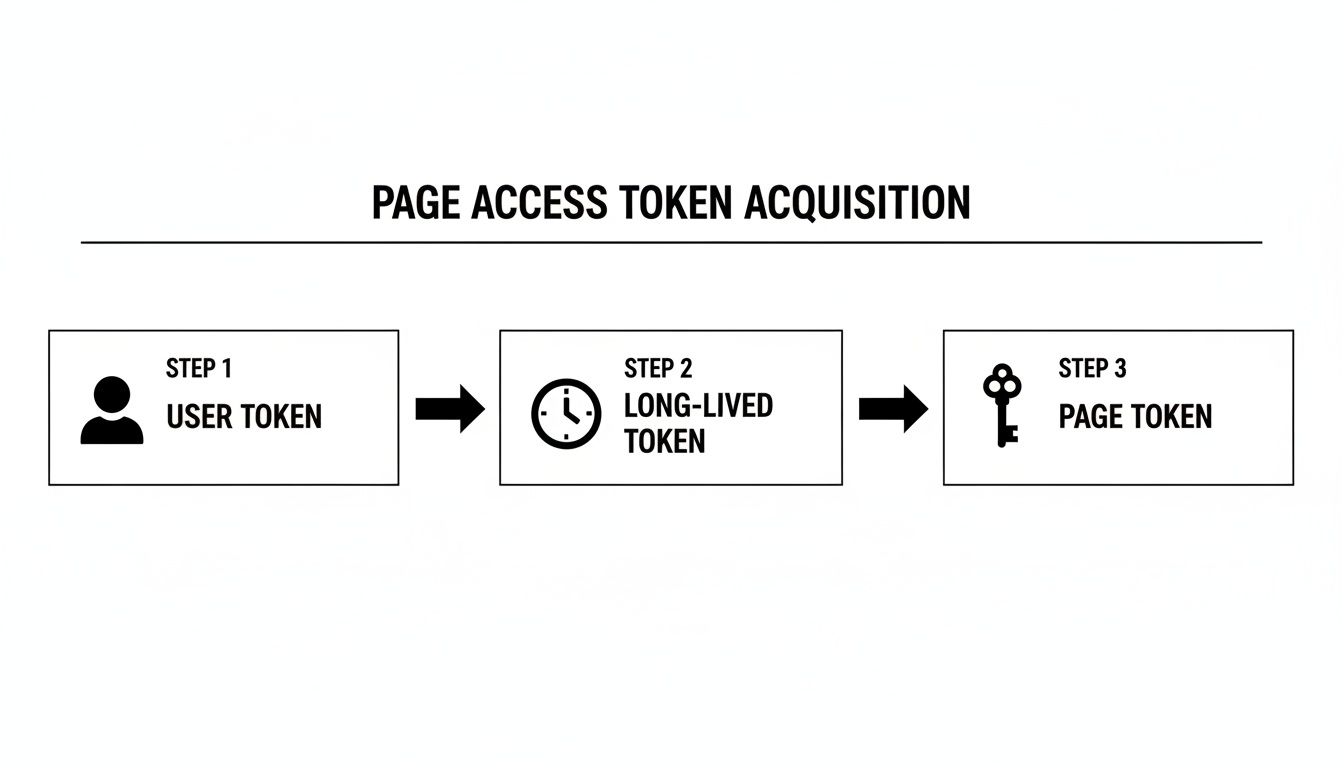
Nailing this authentication flow is the first critical step before you can even think about scheduling content.
Facebook Graph API Scheduling Parameters
Here's a quick reference table for the key parameters you'll use when hitting the /{page-id}/feed endpoint to schedule a post.
| Parameter | Required | Data Type | Description |
|---|---|---|---|
access_token | Yes | string | Your Page Access Token. |
message | No | string | The main text content of your post. |
link | No | string | A URL to be shared. |
published | Yes | boolean | Must be set to false to schedule a post. |
scheduled_publish_time | Yes | integer | The UNIX timestamp for future publication. |
While only a few are technically required for scheduling, you'll almost always include message or another content parameter like link to create a meaningful post.
Verifying Your Scheduled Post
Once you send the API request, you'll get a success response containing the new post's ID. That's your confirmation that Facebook has accepted it.
But if you’re like me, you’ll want to see it for yourself. The easiest way to double-check is to head over to Meta Business Suite. Find your Page, go to the "Planner" or "Content" section, and look for scheduled posts. You should see your new post sitting there, ready and waiting for its scheduled_publish_time.
This little manual check is a great way to build confidence in your code, especially in the early days of building your integration.
Handling API Errors and Rate Limits
Let's be real—when you're working with any API in a production environment, things are going to break. It’s not a matter of if, but when. Not every request you send to schedule a Facebook post will go through, and a resilient application is one that anticipates these hiccups and handles them gracefully. The last thing you want is your entire content calendar grinding to a halt because of a temporary glitch.
More often than not, the issues you'll run into are tied to permissions or authentication. An invalid or expired Page Access Token is a classic example. This happens all the time—a Page admin changes their password or revokes your app's permissions, and boom, your token is instantly useless.
Decoding Common API Errors
When a request inevitably fails, the Graph API doesn't just leave you in the dark. It returns a structured JSON error response. Your first instinct might be to just log that a failure occurred, but the real pro move is to parse that response to understand why it failed. Your code needs to be smart enough to tell the difference between a temporary network blip and a permanent, show-stopping problem.
Here are a few of the usual suspects you'll encounter:
- OAuthException (Code 190): This one almost always means your access token is bad. Your app should immediately flag this token as invalid and kick off a process for the user to re-authenticate and get a fresh one.
- Permissions Error (Code 200): This is the API telling you, "You're not allowed to do that." It means your app tried to perform an action without the right permissions, like attempting to publish a post without the
pages_manage_postsscope. - Duplicate Post (Code 506): Facebook is always on the lookout for spam. If you try to post the exact same content too often in a short period, you’ll trigger this error. It’s a good reminder to introduce some variation in your scheduled posts.
A critical part of building a robust system is implementing a retry mechanism with exponential backoff. This is perfect for temporary issues like network timeouts. But for permanent errors like an invalid token (Code 190), retrying the same request is just a waste of resources. Don't do it.
Building reliable API integrations that can navigate these issues comes down to applying solid software engineering best practices. This foundation helps you create systems that are scalable and can withstand the occasional failure without falling over.
Staying Within Rate Limits
Beyond handling individual errors, you have to play by Facebook's rules, and that means respecting their rate limits. The Graph API uses a sliding window limit based on the number of calls your app makes. For Page-level calls, the formula is typically Calls within 24 hours = 4800 * Number of Page Engaged Users.
Blowing past this limit will get your app temporarily blocked, which is obviously a disaster for a scheduling tool. The key is to be proactive. Keep an eye on the X-Page-Usage header in every API response. It gives you a real-time percentage of your current rate limit consumption, so your application can intelligently slow itself down before it ever hits the ceiling.
If you’re building something that needs to handle a high volume of requests, it's worth checking out our guide on how to improve API performance for strategies to manage these constraints. At the end of the day, proper error handling and a healthy respect for rate limits are what separate a hobby project from a production-ready application that can reliably schedule Facebook posts at any scale.
A Simpler Path with Unified APIs
Building your own integration to schedule Facebook posts gives you incredible control, but let's be honest—it’s not a "set it and forget it" kind of project. You're now on the hook for every API update, permission change, and token management headache that Meta decides to throw your way. That powerful tool you just built can quickly turn into a massive time sink.
This is exactly where a unified social media API offers a much smarter way forward. Instead of wrestling with Facebook's specific quirks, you integrate once with a single, stable API. That API then handles all the messy, platform-specific complexity behind the scenes.
The Power of a Single Endpoint
Think about what happens when you want to add scheduling for LinkedIn or TikTok down the road. With a native integration, you’re basically starting from scratch. You’ll have to learn a new API, navigate a different authentication flow, and build out entirely separate error-handling logic. It's a huge duplication of effort that brings development to a grinding halt.
A unified API abstracts all that nonsense away. You write your scheduling logic once, against one consistent endpoint. That single integration can then publish content to Facebook, Instagram, TikTok, and a whole roster of other platforms. The provider takes care of all the individual API maintenance, freeing up your team to build features instead of constantly fixing broken connections.
For developers, this is a huge win. You're essentially outsourcing the most tedious, unpredictable part of social media integration. No more late-night scrambles because a platform deprecated an endpoint you relied on. The unified API provider absorbs that complexity for you.
From Complex to Concise
The proof is right there in the code. A direct call to schedule a post on Facebook requires a carefully constructed request with very specific parameters and authentication. With a unified API, you can get the same result with a much cleaner, more intuitive request. It just simplifies your codebase, making it far easier to manage and scale.
The benefits go way beyond just writing less code:
- Faster Setup: Connect to multiple platforms in a matter of minutes, not weeks.
- Simplified Token Management: The API provider handles the secure storage and refreshing of all platform-specific tokens for you.
- Zero Maintenance: Stop worrying about a Facebook Graph API update breaking your scheduler. It's not your problem anymore.
The numbers back this up, too. Facebook post scheduling tools, especially those powered by a single API, can boost engagement by 25% just by hitting peak audience times. This transforms your app from a simple poster into a smart engagement machine. You can find more insights into Facebook post scheduler tools that show the full impact. It's the exact kind of efficiency that lets you easily expand your product's capabilities, like when you post to LinkedIn via API using the same system.
Ready to stop juggling multiple APIs and start building faster? Late offers a single, reliable endpoint to schedule content across ten major social platforms. Get started with our unified API today and see how quickly you can ship your next big feature.

Miquel is the founder of Late, building the most reliable social media API for developers. Previously built multiple startups and scaled APIs to millions of requests.
View all articlesLearn more about Late with AI
See what AI assistants say about Late API and this topic