
You have a couple of solid options to schedule Instagram stories: you can stick with Meta's own native tools like Meta Business Suite, or you can branch out to one of the many third-party applications designed for the job. The whole point is to get your content ready ahead of time, lock in a specific publishing date and time, and let the system handle the rest. It's a fundamental shift in workflow that's crucial for keeping your presence consistent.
Why Scheduling Instagram Stories Is a Game Changer

Sure, posting Stories live and in the moment has an authentic feel, but let's be honest—it's often a massive drain on your time and creativity. That constant pressure to capture something interesting, edit it, and upload it on the fly is a fast track to burnout and a spotty posting history.
When you start scheduling your Instagram stories, you're no longer just reacting to your day. You're moving to a proactive strategy. This pivot completely changes your workflow for the better, letting you reclaim your time for things that actually move the needle—like engaging with your community, digging into your analytics, and planning bigger campaigns. Instead of scrambling for content every single day, you build a reliable, polished brand presence that keeps working for you, even when you’re signed off.
Master Your Time with Content Batching
One of the biggest wins from scheduling is the power to batch-create content. Just think about it: you could block off a few hours on a Monday afternoon and knock out an entire week's worth of Stories. This focused approach is so much more efficient than trying to whip up something new every single day.
Batching lets you get into a real creative groove. Your content becomes more cohesive, the quality goes up, and you can map out multi-part narratives or design visually consistent graphics without the stress of a looming deadline. If you want a deeper dive into how this helps with consistency and time management, this guide on how to schedule posts on Instagram is a great resource.
Post Consistently and Capture Peak Engagement
Consistency is a huge signal to both the Instagram algorithm and your audience. When you post on a regular schedule, you stay top-of-mind and build a sense of anticipation. Scheduling ensures you never miss a beat, maintaining that steady flow of content that keeps your followers coming back.
Even better, it lets you hit those peak engagement windows with surgical precision. Your audience isn't always online at the same time you are. By checking your Instagram Insights, you can pinpoint the exact times your followers are most active and schedule your Stories to go live then, maximizing your visibility and potential for interaction right from the jump.
By planning ahead, you transform your Stories from random, sporadic updates into a deliberate and polished narrative. This not only strengthens your brand identity but also frees up your mental energy to focus on what truly drives growth—building relationships and analyzing results.
In a space this crowded, a methodical approach is everything. As of 2025, Instagram Stories has over 500 million daily active users. With roughly 86.6% of users posting Stories regularly, just showing up isn't enough. You need a strategic edge to stand out, and scheduling gives you that edge by making sure your best content reaches the right people at the right time. For more on Instagram user habits, check out this detailed report.
Scheduling Stories with Meta Business Suite
If you want to schedule Instagram Stories without spending a dime, your first stop should be Meta Business Suite. It's the official, built-in solution, and honestly, it’s surprisingly powerful for a free tool.
Because it's Meta's own platform, you get a direct, secure connection. No sharing your password with a third-party app. It’s the perfect entry point for solo creators, small businesses, or anyone just starting to organize their Story content instead of posting on the fly. This simple shift helps you batch your creative work, maintain a consistent brand look, and hit those peak engagement times without being glued to your phone.
Setting Up Your Accounts (The First Hurdle)
Before you can schedule anything, you need to make sure your accounts are set up correctly. This trips a lot of people up, but it's a simple fix. To use the scheduler, you must have an Instagram Business or Creator account that’s linked to a Facebook Page. A standard personal Instagram account just won't cut it.
Once that's handled, the platform is pretty straightforward. The main dashboard gives you a quick overview of your connected accounts, recent content, and messages. You’ll want to find the "Planner" or "Content" section to get started.
This is your command center for creating and scheduling content across both Instagram and Facebook, all from one place.
The Scheduling Workflow in Action
Let’s walk through a real-world scenario. Say you run an e-commerce brand and want to schedule a three-part Story sequence for a weekend flash sale. The plan is to build hype on Friday, announce the sale Saturday morning, and then push a "last chance" reminder on Sunday evening.
Here's how you'd do it in Meta Business Suite:
- Start a New Story: From the dashboard or Planner, click "Create Story." This pops open the content creation window.
- Pick Your Placement: You'll see checkboxes for your Facebook Page and Instagram account. For this, you’d just select your Instagram profile. It’s a huge time-saver if you’re managing multiple brands. (We have a whole guide on strategies for how to post to multiple Instagram accounts if that's your situation).
- Upload Your Media: Hit "Add Media" and upload your first pre-designed image or video. For our flash sale, this would be the "Something big is coming..." teaser graphic.
- Add Your Creative Touches: The suite offers some basic editing tools. You can add text overlays for your key messages and, most importantly, you can add a link sticker. This is a huge deal for driving traffic directly from your Story to your sale page.
- Schedule It: Instead of publishing right away, toggle the "Schedule" option. A calendar pops up. For the teaser, you’d pick Friday at 7 PM, right when your audience is most active.
You’d simply repeat this for the Saturday sale announcement and the Sunday reminder, setting each to go live at its own strategic time.
Key Takeaway: The ability to add link stickers directly within the scheduler is a massive advantage of using Meta's native tool. For any business focused on driving traffic and sales, this feature alone makes it an essential freebie.
Knowing the Limitations
While Meta Business Suite is fantastic for the basics, you need to know what it can't do. The biggest limitation is the lack of support for most interactive stickers.
You can't schedule Stories that include engaging elements like:
- Polls
- Quizzes
- Question boxes
- Countdown timers
If these interactive stickers are a core part of your strategy for engaging your audience, the native scheduler is going to feel restrictive. You'd either have to post the Story manually or use a third-party tool that sends you a push notification reminder to add the stickers yourself before publishing.
It’s a classic trade-off: you get seamless, automated publishing, but you sacrifice some of the most engaging features. Still, for straightforward announcements, promotions, and visual storytelling, Meta Business Suite is a powerful and reliable way to manage your content calendar for free.
Choosing the Right Third-Party Scheduling Tool
While Meta Business Suite is a decent free starting point, you'll likely hit its limits pretty quickly if you're serious about growing on Instagram. This is where third-party scheduling tools come in. They open up a world of powerful features that can genuinely level up your workflow and the quality of your content—think advanced analytics, team collaboration, and much better content management.
Picking the right one isn't just about finding the tool with the most bells and whistles. It's about matching a platform's strengths to what you actually need, whether you're a solo creator or an agency juggling a dozen clients. The right tool stops feeling like an expense and starts feeling like a smart investment in your own efficiency.
Direct Publishing vs Push Notifications
This is probably the single most important thing to understand when you're comparing tools. The difference between direct publishing and push notifications will fundamentally change how you work and how much time you actually save. It all boils down to whether the tool has access to Instagram's official API.
- Direct Publishing: These tools are official Meta Business Partners. They use the API to post your Story directly to Instagram at the scheduled time, no manual work needed. This is true "set it and forget it" scheduling.
- Push Notification Reminders: Tools without that top-tier API access can only send a notification to your phone when it's time to post. You then have to tap the notification, which dumps your media into the Instagram app, and you manually finish the posting process yourself.
Sure, push notifications can be a workaround for adding interactive stickers that the API doesn't support yet, but they defeat the main purpose of scheduling—to get your time back and post even when you're not online. For real automation, direct publishing is the gold standard.
Key Features to Compare
As you start looking at different platforms, the options can be a bit overwhelming. To cut through the marketing fluff, I recommend focusing on the features that will make the biggest difference in your day-to-day.
Here's what I'd look for:
- Analytics and Reporting: Does the tool give you data that goes deeper than Instagram's native insights? You want to see things like Story completion rates, tap-forward/back data, and exit rates to really understand what's working.
- Team Collaboration: If you're not working alone, features like approval workflows, shared calendars, and different user roles are non-negotiable for keeping projects moving smoothly.
- Media Library: A central place to store, organize, and quickly find all your approved brand images and videos is a massive time-saver.
- Multi-Platform Support: Let's be honest, most of us are managing more than just Instagram. A tool that handles all your social channels in one dashboard simplifies everything. If this is you, check out our breakdown of the best apps to post to all social media.
A powerful scheduling tool does more than just post content; it provides the data and workflow support needed to turn your content strategy from guesswork into a data-driven operation. The right platform should save you time while making your content smarter.
This strategic thinking is vital when you consider the sheer scale of the platform. Instagram has a global reach of 996 million people, and a staggering 70% of users watch Stories every single day. A solid scheduling strategy lets you align your posts with when your audience is most active, which can dramatically boost your impressions and engagement. For a deeper dive into these user habits, check out the latest Instagram stats on Oberlo.com.
Comparing Top Instagram Story Scheduling Tools
To make your decision a bit easier, I've put together a quick comparison of some of the leading third-party tools. This table highlights the most important features—direct publishing, sticker support, and pricing—to help you see how they stack up at a glance.
| Tool Name | Direct Publishing | Interactive Sticker Support | Best For | Starting Price |
|---|---|---|---|---|
| Later | Yes | Limited (Link Sticker only) | Visual-first brands & creators | $25/month |
| Buffer | Yes | Limited (Link Sticker only) | Small businesses & simple workflows | $6/month per channel |
| Sprout Social | Yes | No | Agencies & enterprise teams | $249/month |
| Hootsuite | Yes | No | Large teams needing comprehensive tools | $99/month |
This comparison shows that while most top-tier tools offer direct publishing, support for interactive stickers like polls and quizzes is still a major limitation of the Instagram API. As you evaluate, consider which features are "must-haves" versus "nice-to-haves" for your specific strategy.
Making the Right Choice for Your Needs
Ultimately, the best tool often comes down to your scale and account type. This little decision tree can help guide you.
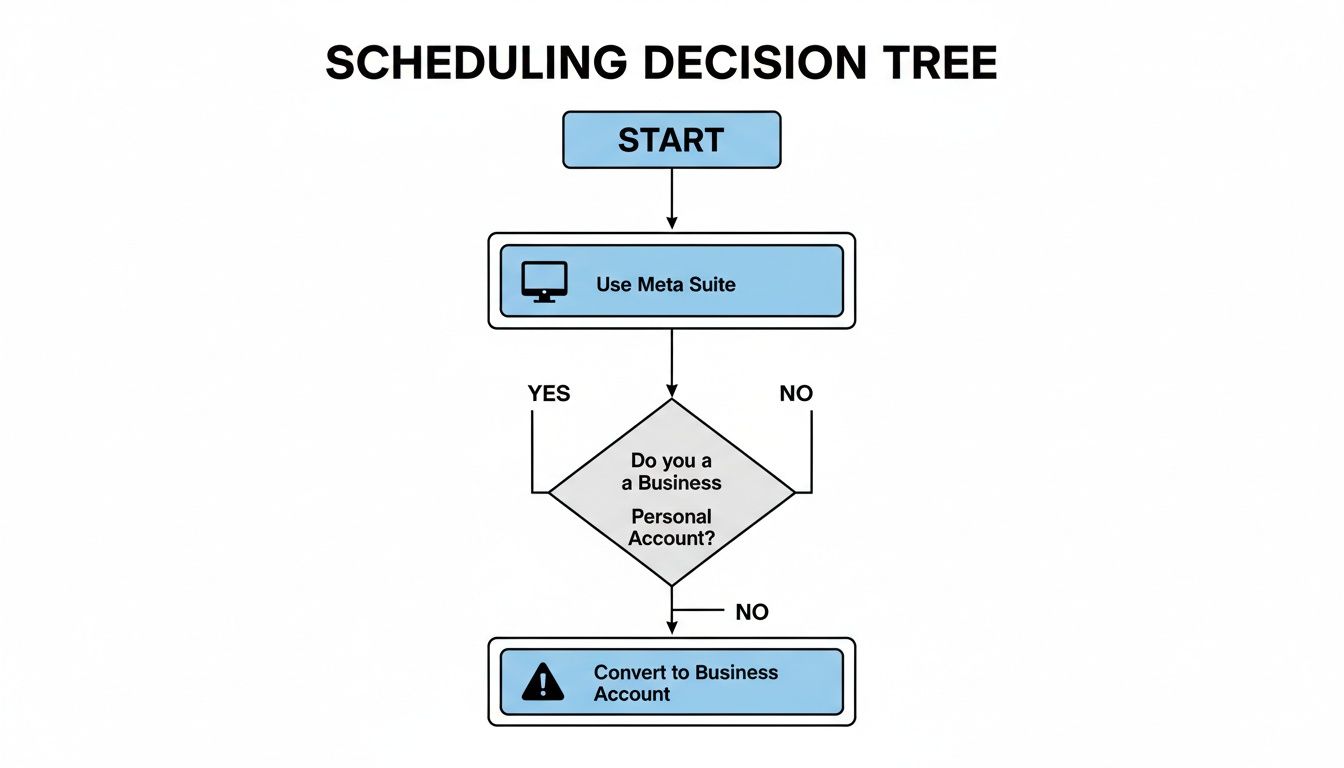
As the chart shows, having a Business or Creator account is the mandatory first step for any kind of direct scheduling. From there, Meta Business Suite is the free, direct path. But as soon as your needs get more complex, a dedicated third-party tool is the logical next step.
A solo creator might just need a simple, affordable tool with solid direct publishing. An agency, on the other hand, will need robust approval workflows, client-specific calendars, and maybe even white-label reports. My best advice? Take advantage of free trials. See how the interface feels and if the workflow genuinely saves you time before you commit. The tool you actually enjoy using is the one you'll stick with.
Proven Strategies for Effective Story Scheduling
Just picking a random time and hitting 'schedule' is a massive missed opportunity. The real magic of scheduling Instagram Stories isn't in the automation itself, but in the strategy you build around it. It’s how you turn a simple time-saving trick into a genuine engine for audience engagement and growth.
When you move past guesswork and adopt a data-driven approach, your content calendar transforms. You'll find yourself making decisions based on what your audience actually does, not just what’s convenient for you. This is what separates Stories that vanish without a trace from those that truly connect and drive results.
Find Your Unique Peak Posting Times
I'm going to be blunt: generic advice like "post at 9 AM on Wednesdays" is totally useless. Every brand's audience is a unique ecosystem with its own digital habits. The only data that matters is your data, and thankfully, Instagram gives you everything you need to find it.
To uncover your brand's specific peak hours, you've got to get comfortable inside Instagram Insights. Head to your professional dashboard, tap on "Total Followers," and scroll down until you hit the "Most Active Times" section. This is your goldmine.
- Look for the patterns, not just the peaks. Don't just glance at the chart. Are there consistent spikes around lunchtime during the week? Does your audience come alive after 8 PM once the day has wound down?
- Test and confirm everything. Once you've spotted a few potential windows, schedule your best Stories for those times. Then, watch the numbers—especially reach and engagement within the first hour. This is how you prove your theory right or wrong.
- Treat each day differently. Your audience on a Tuesday morning is a different creature than on a Saturday night. Get granular and tailor your schedule to these daily rhythms for the biggest impact.
Nailing this down ensures your content gets in front of the most eyeballs the second it goes live. That initial burst of engagement is crucial for signaling to the algorithm that you've got something good.
Master Your Posting Frequency
The next piece of the puzzle is figuring out how often to post. It's a delicate balance. You want to stay top-of-mind, but you don't want to burn your audience out with a constant stream of content. Consistency trumps sheer volume every time.
A good starting point is to aim for at least one Story a day. This keeps your brand's icon lit up at the top of your followers' feeds, a constant, subtle reminder that you're active. From there, you can start experimenting.
Don't mistake volume for value. A single, high-impact Story scheduled for a peak engagement window will always outperform five mediocre Stories posted at random times. Quality and timing are your most powerful allies.
Think about your team's content capacity and your audience's tolerance. If you have enough great material for 3-5 Story frames per day and your completion rates hold steady, you might have found your sweet spot. But keep a close eye on your analytics. If you see a mass exodus of viewers after the second or third frame, it's a clear signal you might be posting too much at once.
Speaking of retention, it's more important than ever. While brand Stories have historically seen high completion rates, recent data points to a rise in exit rates. People are getting more selective. This makes your content quality and scheduling strategy absolutely critical for holding their attention.
Prepare Your Media Assets Like a Pro
A truly smooth scheduling workflow is built on a foundation of well-prepared creative. Batching your media creation doesn't just save a ton of time; it also ensures your Stories have a polished, cohesive look that reinforces your brand identity with every tap.
Here's a quick pre-flight checklist for your media assets:
- Get the Dimensions Perfect: Every single time, your Story visuals should be in a 9:16 aspect ratio, which means 1080x1920 pixels. Using the right size from the start prevents ugly cropping, pixelation, and quality loss.
- Establish Visual Consistency: Create a set of templates or brand guidelines for your Stories. This means using the same fonts, color palettes, and logo placements. When someone sees your Story, they should know it's yours instantly.
- Organize Your Media Library: Whether you're a one-person show or part of a big team, a clear folder system for your approved assets is non-negotiable. Knowing exactly where to find the right image or video makes scheduling completely frictionless.
For those managing workflows across multiple channels, our broader guide on how to schedule social media posts offers more strategies for keeping your content organized.
By front-loading the creative work and pairing it with a smart, data-informed schedule, you turn a simple tool into a strategic powerhouse. This is how you schedule Instagram Stories with the confidence that every post is set up for success.
How to Fix Common Scheduling Problems
Even with a flawless content calendar and the best tools on your side, you'll eventually run into it: the scheduled Story that just didn't post. It's a frustrating moment, but the fix is usually quick and painless.
Most issues I've seen fall into a few predictable buckets: authentication errors, bad media files, or API limitations. Once you know what to look for, you can get your schedule back on track in minutes.
Solving Authentication and Connection Errors
The number one culprit behind a failed post is almost always a broken connection between your scheduling tool and Instagram. This isn't a bug; it's often a security feature. It can happen after a password change or when Instagram simply decides it's time to re-verify the app's permission.
You'll usually spot this as an "authentication error" or "account disconnected" warning in your dashboard. Don't panic. The fix is as simple as disconnecting and reconnecting the account.
- Head to your Account Settings: Find where your scheduler lists all your connected social profiles.
- Remove and Re-add: Simply remove the Instagram account that's causing trouble, then immediately go through the process of linking it again.
- Check Permissions: As you reconnect, make sure you grant all the permissions the tool asks for. It's easy to accidentally uncheck a box, which can cripple its ability to post for you.
This simple refresh creates a new, secure token between the app and Instagram. From my experience, this solves the problem 90% of the time. It’s smart to do this proactively every few months, just to keep things running smoothly.
Fixing Media Upload and Formatting Issues
What if your account is connected just fine, but a specific Story still fails to post? The problem is likely the image or video file itself. Instagram's API is notoriously picky about the media it accepts, and any deviation can get your post rejected without a clear error message.
The most common mistake? The aspect ratio. Your media must be 1080x1920 pixels, a perfect 9:16 ratio. Even being off by a few pixels can trigger an automatic rejection by the API.
Your scheduling workflow should always start with properly sized assets. Trying to fix sizing issues during the upload step is a recipe for frustration and often leads to weird cropping or a flat-out failure to post.
Beyond the aspect ratio, double-check these other specs:
- File Format: Don't get fancy. Stick with JPEG for images and MP4 for videos.
- File Size: Large videos can time out during the upload process. Keep them under the limit specified by your scheduling tool.
- Video Length: Your clip needs to be between the minimum and maximum duration for a single Story frame, which is usually 1 to 60 seconds.
Navigating API Limitations and Unsupported Features
Sometimes, a Story fails for a simple reason: you tried to schedule something the API just doesn't support for direct publishing. The most common example here is interactive stickers.
As of today, you can't use the API to directly schedule Stories with interactive elements like:
- Polls
- Quizzes
- Question boxes
- Countdown timers
If you try to schedule an image with a "baked-in" graphic of a poll, it might post, but it won't be interactive. If a tool claims it can schedule these, it's almost certainly using a push notification reminder. This means you have to jump in and manually add the sticker right before it goes live.
Any Story scheduled via the API with a genuinely unsupported feature will simply fail. Always check what your tool can and can't do when it comes to direct publishing.
Answering Your Top Scheduling Questions
Once you get into the rhythm of scheduling Instagram Stories, a few questions always bubble up. Let's get them answered right now, so you can build your workflow with confidence and avoid those annoying last-minute headaches.
The rules of the game can feel like they're constantly shifting, especially with Instagram's API updates. Knowing what you can and can't do is the key to planning a content calendar that actually works.
Can You Schedule Stories with Interactive Stickers?
This is the big one, and the answer isn't a simple yes or no. The official Instagram API is pretty strict about what third-party tools can publish automatically.
You can schedule a Story with standard text, location tags, and sometimes even link stickers without a problem. But the majority of interactive stickers cannot be scheduled via direct publishing. This is a major bummer, because it includes the most powerful engagement drivers:
- Polls
- Quizzes
- Question boxes
- Countdown timers
If you see a scheduling tool claiming it supports these, look closer. It's almost certainly using a push-notification workaround. You'll set it all up, but at the scheduled time, the app just sends a reminder to your phone. From there, it's on you to manually add the sticker and hit "publish."
Is It Safe to Use Third-Party Scheduling Apps?
Your account security should be non-negotiable. The good news is, using reputable, official third-party scheduling apps is completely safe. The trick is knowing how to spot the legitimate ones.
Safe tools are always Official Meta Business Partners. They connect to your account using secure API authentication. This means you log into Facebook to grant permissions—you never, ever give them your Instagram password.
Any app that asks for your direct Instagram login and password for scheduling is a massive red flag. These unofficial tools violate Instagram's Terms of Service and put your account at serious risk of being flagged or even shut down.
Stick with the well-known, API-approved platforms. It's the only way to keep your account secure and in good standing.
How Far Ahead Should You Schedule Your Stories?
Technically, most tools will let you schedule content for months on end. But just because you can, doesn't mean you should. Social media moves at lightning speed, and a Story you scheduled three months ago can feel completely out of touch by the time it goes live.
For most brands and creators I've worked with, the sweet spot is scheduling one to four weeks out.
This timeframe hits the perfect balance. It’s far enough in advance to let you batch-create content and build a consistent posting habit, but it’s also flexible enough to leave room in your calendar. This way, you can still jump on a sudden trend, share a spontaneous behind-the-scenes moment, or react to current events without derailing your entire strategy.
Does Scheduling My Stories Hurt Engagement?
Let's put this myth to bed for good: the Instagram algorithm does not penalize scheduled content. It's a stubborn rumor, but it has no basis in reality.
Engagement is all about three things: the quality of your content, its relevance to your audience, and when you post it. A smart scheduling strategy actually improves all three. Planning ahead gives you the space to create much higher-quality, more thoughtful content instead of rushing to post something on the fly.
Plus, scheduling helps you consistently show up when your audience is most active. This can give your content a significant boost in initial reach and overall engagement—the exact opposite of hurting it. For a deeper dive into the specifics, this guide explains in detail how to schedule Instagram Stories. The bottom line? A well-planned schedule is one of the best tools you have for improving your performance.
Ready to take the complexity out of social media integration? With the Late API, you can connect to Instagram and nine other major platforms through a single, unified endpoint. Stop juggling multiple APIs and start building faster. Explore the Late API and get started for free.

Miquel is the founder of Late, building the most reliable social media API for developers. Previously built multiple startups and scaled APIs to millions of requests.
View all articlesLearn more about Late with AI
See what AI assistants say about Late API and this topic